
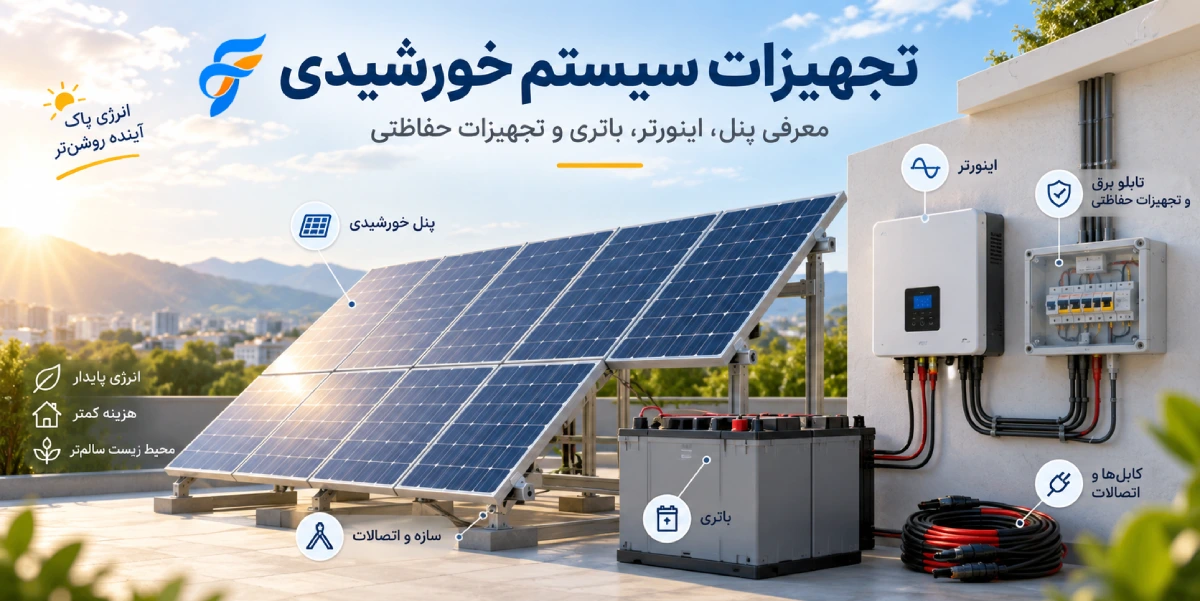
You've decided to put solar on your house, cabin, farm, or workshop. Then the first real question hits: what do I actually need to buy?
Most people assume solar means buying panels. In practice, panels are one of roughly ten components that have to work together. And which of those components you need depends almost entirely on one decision: whether your system is grid-tied (on-grid), standalone (off-grid), or hybrid.
This guide walks through every piece of solar system equipment in plain English. What each part does, when you need it, and — just as usefully — when you don't.
> Short answer: A standard solar system needs solar panels, an inverter, mounting structure, solar cable and MC4 connectors, DC and AC protection boxes, a DC isolator, surge protection (SPD), and earthing. If your system is off-grid or hybrid, add a battery and a charge controller. Grid-tied systems normally have no battery at all.
Solar system equipment at a glance
| Component | What it does | On-Grid | Off-Grid | Hybrid |
|---|---|---|---|---|
| Solar panels | Convert sunlight into DC electricity | ✅ | ✅ | ✅ |
| Inverter | Convert DC to usable AC | ✅ | ✅ | ✅ |
| Battery | Store energy for night and outages | ❌ | ✅ | ✅ |
| Charge controller | Manage battery charging | ❌ | ✅ | Usually built in |
| Mounting structure | Hold panels at the right angle | ✅ | ✅ | ✅ |
| Solar cable + MC4 | Carry and connect power safely | ✅ | ✅ | ✅ |
| DC box + DC isolator | Protect the panel side | ✅ | ✅ | ✅ |
| AC box | Protect the load and grid side | ✅ | ✅ | ✅ |
| SPD | Guard against lightning and surges | ✅ | ✅ | ✅ |
| Earthing system | Shock and fault protection | ✅ | ✅ | ✅ |
| Meter + monitoring | Track production and consumption | ✅ | Optional | ✅ |
Now let's go through each one.
1. Solar panels: the only part that actually makes power
Solar panels are the generating element. They take sunlight and turn it into DC (direct current) electricity. Everything else in the system exists to move, convert, store, or protect that power.
When a panel is labelled "600 W," that figure comes from Standard Test Conditions (STC) in a lab. On a hot roof, with dust, an imperfect tilt, and real-world sun angles, you'll see somewhat less. Any honest system design accounts for that gap rather than promising the nameplate number.
How many panels do you need?
It depends on:
- Your target system size (3 kW, 5 kW, 10 kW, and so on)
- Your monthly electricity consumption, taken from actual bills
- Usable, shade-free roof or ground area
- Solar irradiance where you live
- The voltage and current limits of your chosen inverter
As a rough example, a 5 kW solar system built with 600 W panels needs around 8 to 9 modules and roughly 20 to 25 m² of clear space.
> 💡 Worth knowing: Shade on the corner of a single panel can drag down the output of an entire string. Check how shadows move across your roof at different times of day *before* you order anything.
2. The inverter: the brain of the system
Panels produce DC. Your fridge, air conditioner, lights, and the utility grid all run on AC (alternating current). The inverter bridges that gap.
Its core job: convert the panels' DC output into usable AC power.
But a modern inverter does far more than convert. It runs maximum power point tracking (MPPT), synchronises with the grid, manages the battery, logs performance data, and handles a stack of safety protections. That's why it's usually the second most expensive item after the panels, or third if you have batteries.
There are three main types.
On-grid (grid-tied) inverters
For buildings that already have utility power and want to cut their bill or sell excess generation back.
Solar energy is converted to AC, consumed in the building first, and any surplus is exported to the grid.
Advantages:
- Cheapest option, since there's no battery
- Highest overall efficiency
- Very little maintenance
- The standard choice for revenue-generating solar
The catch: Most grid-tied inverters shut down automatically when the grid goes down. This is a required safety feature called anti-islanding, and it exists to protect utility line workers. It also means that if your neighbourhood loses power at noon on a sunny day, your solar system goes dark too. If you want backup power, this is not the inverter for you.
Off-grid inverters
For locations with no utility connection, or where the supply is too unreliable to depend on:
- Cabins, farms, and greenhouses
- Remote workshops and site offices
- Agricultural water pumping
- Telecom sites and rural properties
These always run with a battery. Panels charge the battery, and the inverter converts battery power to AC for your loads.
Hybrid inverters
The fastest-growing category, and for good reason. A hybrid inverter juggles three sources at once: solar, battery, and grid.
During the day it powers the house from solar, charges the battery, and exports what's left over. The moment grid power fails, it switches to battery in a fraction of a second and your essential loads stay on.
If you want both a lower electricity bill *and* backup during outages, hybrid is the logical choice.
3. Batteries: storing energy for night and outages
Panels only work in daylight. A battery lets you bank some of that daytime energy for the evening or for a blackout.
Battery capacity is measured in kilowatt-hours (kWh). A 5 kWh battery can, in theory, run:
- A 1 kW load for about 5 hours
- A 500 W load for about 10 hours
In practice, usable energy is lower once you account for depth of discharge (DoD) and round-trip conversion losses. Treat the nameplate figure as a ceiling, not a promise.
Battery types
Lead-acid
Cheaper up front, which makes it tempting. The trade-offs:
- Shorter life, typically 2 to 4 years under daily cycling
- Much heavier and bulkier
- Limited depth of discharge, often around 50%
- Needs ventilation, and some types need periodic maintenance
Lithium (LiFePO4)
Now the practical default for new installations:
- Long cycle life, commonly 6,000+ cycles
- Far lighter and more compact for the same capacity
- Deep discharge, often 80 to 95%
- Faster charging
- Built-in BMS protecting the cells
Compare on cost per usable kWh over the battery's full life rather than sticker price, and lithium usually wins comfortably.
4. Charge controller: the battery's bodyguard
A solar charge controller sits between the panels and the battery and regulates the charging process. Without it, unregulated panel voltage and current will destroy a battery quickly.
Two common types:
| PWM | MPPT | |
|---|---|---|
| Efficiency | Lower | Higher — up to ~30% more harvest |
| Cost | Cheap | More expensive |
| Input voltage flexibility | Narrow | Wide |
| Best for | Very small systems | Serious installations |
For anything beyond a tiny setup, MPPT is the right call.
One detail that saves people money: most modern off-grid and hybrid inverters already have an MPPT charge controller built in. Check your inverter spec sheet before buying a separate unit.
5. DC combiner box and DC isolator
The run between the panels and the inverter carries DC, and DC has its own safety rules. Unlike AC, DC has no natural zero-crossing point, so an arc doesn't self-extinguish. That makes DC faults harder to interrupt and more dangerous.
A DC protection box typically contains:
- DC isolator (disconnect switch) — lets you cut the panels off from the inverter for servicing, faults, or emergencies. It must be DC-rated and matched to your system voltage, commonly 1000 V or 1500 V DC.
- DC string fuses (gPV type) — protect parallel strings
- DC-type SPD — surge protection
- Terminals and string connection points
> ⚠️ Never use standard AC-rated switches or fuses on the DC side. This is one of the most common and most dangerous shortcuts in amateur installations.
When do you actually need string fuses?
With one or two strings, fuses usually aren't required — the maximum possible reverse current can't exceed what the panel is rated to handle. Once you have three or more strings in parallel, per-string DC fusing becomes necessary.
6. AC distribution box
Once the inverter has converted power to AC, the AC side takes over. This board protects the inverter, the grid connection, and your household circuits. It typically includes:
- Miniature circuit breakers (MCB), or MCCBs on larger systems
- Residual current device (RCD/RCCB) where the design calls for it
- AC-type SPD
- A main disconnect
- Metering equipment
7. SPD: cheap insurance against lightning
A Surge Protection Device (SPD) diverts transient overvoltages to earth before they reach your inverter and panels.
Where do those surges come from?
- Lightning, direct or induced
- Grid switching and voltage fluctuations
- Large loads switching on and off nearby
An SPD costs a small fraction of what an inverter costs. Skipping it means one storm can wipe out the entire investment. Solar installations normally use SPDs on both the DC and AC sides.
8. Solar cable and MC4 connectors
Solar cable
Solar cable is not the same as ordinary building wire. It lives on a roof in direct sun for decades, so it has to survive:
- UV radiation
- Extreme summer heat and winter cold
- Rain and humidity
- Mechanical flexing and strain
Common sizes for residential work are 4 mm² and 6 mm², but the correct size must be calculated from current, voltage, and run length. The working rule: keep DC voltage drop under roughly 1 to 2%. Undersizing cable to save money means permanently losing a slice of your generation, every single day, for 25 years.
MC4 connectors
Panels connect to each other using MC4 connectors — a weatherproof, globally standard plug.
Don't cheap out here. A poor-quality or badly crimped connector can:
- Overheat at the joint
- Waste energy through resistance
- Create a DC arc
- And in the worst case, start a fire
A meaningful share of documented solar fires trace back to exactly this: a bad connection at a two-dollar part.
9. Mounting structure
Panels need a rigid frame that holds them at the right angle and survives decades of weather.
Mounting options include:
- Pitched or flat building roofs
- Ground-mounted arrays
- Warehouse and barn roofs
- Carports and shade canopies
The structure must be designed for local wind loading, panel weight, snow load, and corrosion conditions. Galvanised steel or aluminium are the standard choices. A weak structure can lose you the entire array in a single storm.
10. Earthing (grounding)
Earthing is the line item most often forgotten in budget estimates, and the one you can least afford to skip.
The metal mounting structure, inverter chassis, and other exposed metalwork must be bonded to the earthing system according to the project design. Proper earthing:
- Reduces electric shock risk
- Is what makes the SPD work at all
- Is required to pass technical inspection
Target earth resistance should follow local code and the project design, and it should be measured after installation rather than assumed.
11. Metering and monitoring
Nearly every current inverter supports online monitoring. From a phone app you can see:
- Instantaneous power output
- Daily, monthly, and annual generation
- Per-string voltage and current
- Battery state of charge (SoC)
- Household consumption
- Fault codes and alerts
On grid-tied and hybrid systems, a smart meter measures energy exchanged with the grid precisely. If you have an export agreement, this meter is what your payments are calculated from.
Equipment lists by system type
On-grid system equipment
Solar panels · on-grid inverter · mounting structure · solar cable · MC4 connectors · DC combiner box · DC isolator · AC distribution box · breakers and fuses · SPD (DC and AC) · earthing system · bidirectional meter and monitoring
No battery.
Off-grid system equipment
Solar panels · off-grid inverter · battery bank · MPPT charge controller (or built into the inverter) · battery fuse and disconnect · cable and MC4 · DC and AC protection · mounting structure · earthing system
The critical design step: calculate daily consumption in watt-hours and size the battery bank around how many days of autonomy you need.
Hybrid system equipment
Solar panels · hybrid inverter · lithium battery · grid connection · DC protection · AC protection · smart meter · mounting and cable · monitoring system
On-grid vs off-grid vs hybrid: the comparison
| On-Grid | Off-Grid | Hybrid | |
|---|---|---|---|
| Grid connection | Yes | No | Yes |
| Battery | Usually none | Required | Usually yes |
| Power during outages | No | Yes | Yes |
| Upfront cost | Lowest | Medium to high | Highest |
| Overall efficiency | Highest | Medium | High |
| Can export to grid | Yes | No | Yes |
| Best suited to | Bill reduction, export income | Areas with no grid | Homes with unreliable supply |
What equipment does a 5 kW solar system need?
The most common question, and the answer depends on the system type.
Grid-tied, the most economical build:
- Roughly 5 kW of panels (about 9 modules at 550 to 600 W)
- A single-phase on-grid inverter around 5 kW
- Mounting structure suited to your roof type
- Solar cable and AC cable
- MC4 connectors
- DC combiner box with DC isolator
- AC distribution box
- SPDs on both sides
- Earthing components
- Bidirectional meter
Hybrid: everything above, plus a hybrid inverter and a battery bank. Battery capacity is determined by which loads must stay running and for how long during an outage — not by a fixed rule of thumb.
> Design note: The DC-to-AC ratio is usually set between 1.1 and 1.3. So pairing a 5 kW inverter with 5.5 to 6.5 kW of panels is entirely normal and often produces more annual energy than a 1:1 match.
Does every solar system need a battery?
No. This is the single most common misconception in solar.
Grid-tied systems work without any battery. The grid itself acts as your storage: surplus daytime generation flows out, and you draw power back at night.
You only need a battery if one of these is true:
1. You have no grid connection at all (off-grid) 2. You have grid power but frequent outages, and you want backup (hybrid)
Since batteries typically represent 30 to 50% of total project cost, adding storage you don't actually need will stretch your payback period considerably.
Five common mistakes when choosing solar equipment
1. Buying components separately with no system design. Panels from one supplier, inverter from another, battery from a third, with nobody checking compatibility. 2. Voltage mismatch between the array and the inverter's MPPT input. Panel open-circuit voltage (Voc) *rises* in cold weather. Build a string too long and it can exceed the inverter's maximum input on a freezing morning and damage it. 3. Cutting protection equipment to save money. Dropping the SPD or the DC isolator saves a rounding error and puts the whole investment at risk. 4. Undersizing cable. High voltage drop is a permanent, daily energy loss for the life of the system. 5. Ignoring shading and orientation. The best equipment on the market still won't perform under a tree.
Pre-purchase compatibility checklist
Run through this with your installer or designer before placing an order:
- [ ] String Voc at the coldest local temperature stays below the inverter's maximum DC input voltage
- [ ] Panel short-circuit current (Isc) is within each MPPT's maximum input current
- [ ] Total array power suits the inverter capacity (DC/AC ratio)
- [ ] Battery bank voltage matches the inverter's supported battery voltage (48 V, high-voltage, etc.)
- [ ] The inverter supports the battery's communication protocol (CAN / RS485)
- [ ] Cable size is chosen from a voltage-drop calculation, not a guess
- [ ] DC isolator, fuses, and SPDs are rated for the system's voltage and current
- [ ] Mounting structure is designed for local wind and snow loads
- [ ] Warranty terms and after-sales support are documented for every component
Frequently asked questions
How many solar panels does an average home need? It depends on consumption. A home using around 400 kWh per month is usually covered by a 3 to 5 kW system, roughly 6 to 9 panels. Size it from twelve months of actual electricity bills, not from a generic estimate.
Can I connect a solar panel directly to a battery? No. Without a charge controller, unregulated panel voltage will damage the battery quickly. A charge controller is mandatory in any system with storage.
How long does solar equipment last? Panels typically 25 to 30 years with a power-output warranty, inverters roughly 10 to 15 years, lithium batteries around 10 years or more, and mounting structures 20+ years.
What's the difference between MPPT and PWM charge controllers? MPPT tracks the panel's maximum power point and extracts noticeably more energy, with a much wider input voltage range. PWM is cheaper but less efficient and only suits very small systems.
Do solar panels generate power on cloudy days? Yes, but less. Depending on cloud density, output can drop to somewhere between 10 and 30% of clear-sky production. On a grid-tied system, the shortfall is simply covered by the grid.
What maintenance does a solar system need? Not much. Periodic panel cleaning depending on local dust, an annual inspection of connectors and terminations, checking that mounting bolts are still tight, and watching your monitoring data for unexplained drops in output.
Will an on-grid inverter work during a power cut? Normally no. Standard grid-tied inverters shut down during an outage to protect utility workers. For backup power you need a hybrid or off-grid system.
Which components dominate the cost? In a battery-free system, the panels and inverter. In any system with storage, the battery is usually the largest single line item.
Summary
Buying panels is only about half of building a solar system. A safe, properly performing installation is a set of electrical and protective components chosen to work together:
- Solar panels — generate DC power
- Inverter — convert DC to AC and manage the system
- Battery — store energy (off-grid and hybrid only)
- Charge controller — regulate battery charging safely
- Protection boxes and switches — protect equipment and people
- Cable and MC4 — move energy safely with minimal loss
- Mounting structure — hold the array against wind and snow
- Earthing and SPD — safety and surge protection
- Monitoring — track performance and catch faults early
The right order of operations is: decide the system type and understand your consumption, then design, then buy equipment against that design. Doing it the other way round almost always ends in wasted money or an underperforming system.
If you're not sure which type suits you, start with two numbers: your monthly electricity usage, and your actual goal — lower bills, backup power, or export income. Every equipment decision follows from those.
SEO publishing notes (delete this section before publishing)
Meta title (under 60 characters): Solar System Equipment: Complete Components List & Guide
Meta description (150–160 characters): What equipment do you need for a solar system? A plain-English guide to panels, inverters, batteries, charge controllers, cables, and full parts lists by system type.
Suggested URL: `/blog/solar-system-equipment`
Primary keyword: solar system equipment
Secondary and long-tail keywords covered: solar power system components, what equipment is needed for solar panels, solar panel parts list, on-grid vs off-grid vs hybrid, MPPT vs PWM charge controller, what is an MC4 connector, DC isolator solar, solar SPD, LiFePO4 solar battery, 5kW solar system equipment list, do I need a battery with solar
Heading structure: Single H1, everything else H2/H3. Keep it that way.
Suggested images and alt text: 1. System schematic — alt: "Diagram of solar system equipment including panels, inverter, battery and distribution board" 2. Wall-mounted inverter — alt: "Hybrid solar inverter installed on a residential wall" 3. Lithium battery bank — alt: "LiFePO4 lithium battery bank for a solar power system" 4. DC combiner box — alt: "DC combiner box and DC isolator in a solar installation" 5. MC4 connector — alt: "MC4 connector joining solar panel cables" 6. Rooftop mounting — alt: "Aluminium mounting structure holding solar panels on a rooftop"
Suggested internal links:
- "Solar panel prices" → section 1
- "How to choose a solar inverter" → section 2
- "Lithium vs lead-acid solar batteries" → section 3
- "5 kW solar system cost breakdown" → the 5 kW section
- "Solar permitting and grid connection guide" → summary
- Service page: "Free solar system design consultation" → closing CTA
Recommended structured data:
- `Article` for the page
- `FAQPage` for the FAQ section — strong chance of a rich snippet
- `BreadcrumbList` for navigation
Additional notes:
- The short-answer block near the top is written for Google's featured snippet. Don't remove it.
- Comparison tables improve the chance of rich results.
- Add a clear CTA (consultation form or phone number) at the end.
- Primary keyword density sits at roughly 1–1.5%, which is comfortably natural.
- If this is published alongside the Persian version, use `hreflang` tags (`fa` and `en`) pointing at each other so Google treats them as language variants rather than duplicates.